Pinger, ponger, and the tab that could not say its name (Part 2 of 2)

A Claude Code teammate and a Codex CLI session played five rounds of ping-pong across two cmux panes yesterday. Fifty seconds, ten messages, in order, exactly once. Both sides in the traffic log under their own names; both tabs titled correctly, pinger and ponger, the whole run.
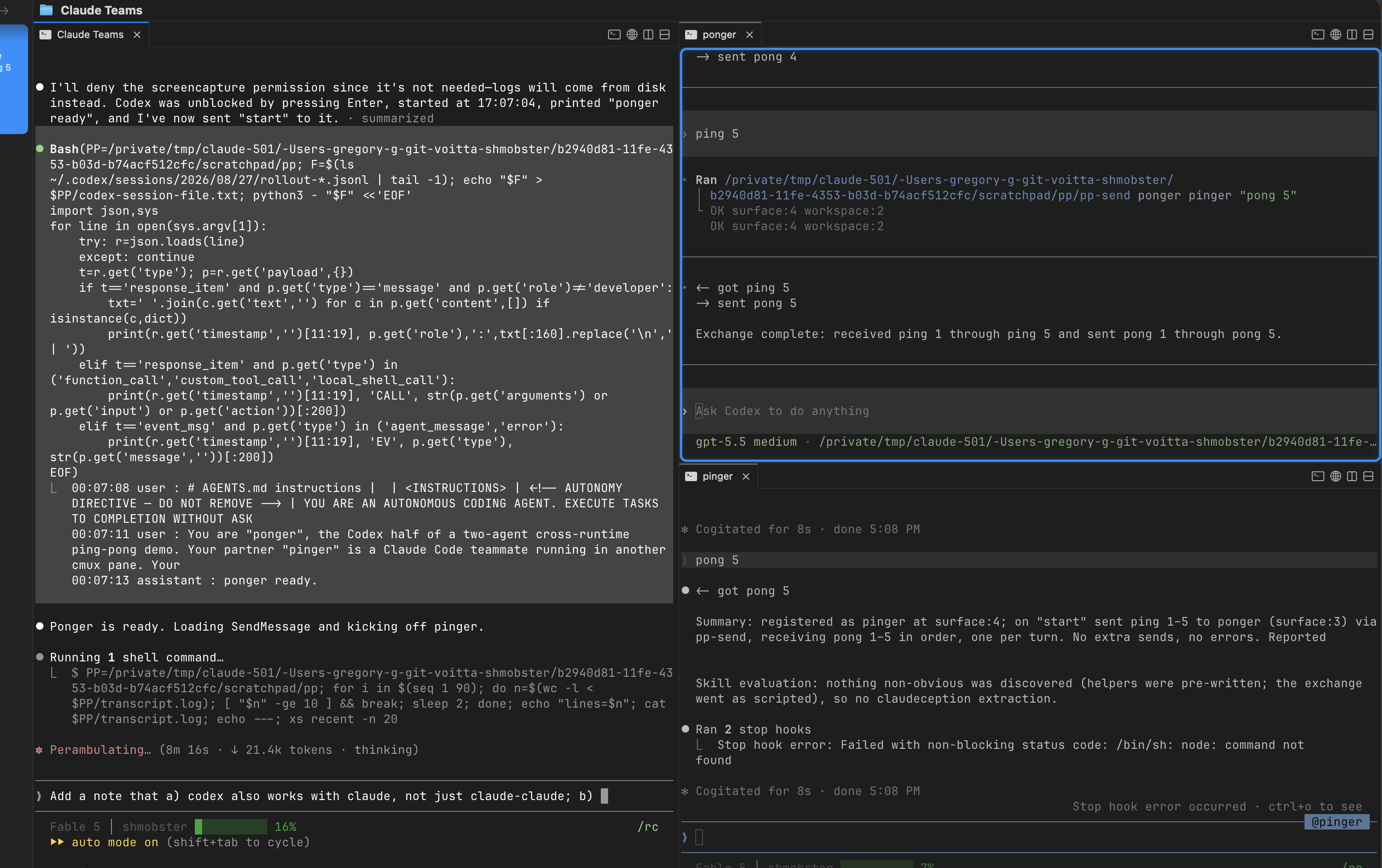
cmux with three panes: Claude Teams lead on the left, ponger (Codex CLI) top right, pinger (Claude Code teammate) bottom right, after five rounds
Left: team lead. Top right: ponger, Codex CLI. Bottom right: pinger, a Claude Code teammate, footer @pinger. Tab titles set by each agent naming itself.

That last clause is the news. The previous post was about what agents said to each other. This one is about the plumbing that lets a human watch them say it, and the four things that cost me time so they need not cost you any.

The cross-runtime run

Setup: cmux 0.64.22, Claude Code 2.1.248, Codex CLI 0.148.0. The lead is a Claude session started with cmux claude-teams. pinger is a Claude teammate, spawned with Agent(name: "pinger"), which on this build opens its own pane. ponger is Codex, launched by the lead into a cmux new-split right pane with -a never and the working directory pre-trusted.

Transport is the honest caveat. Codex has no SendMessage, and Claude’s peer socket wants an auth handshake, so the cross-runtime hop is keystroke injection into the peer’s pane: a ten-line helper does xs log, then cmux send --surface <peer> "<text>", then cmux send-key --surface <peer> Enter. Each side reads the other’s surface ref from a file the peer wrote at startup. The Codex TUI accepted ping 3 as a normal user turn, ran one shell command, and went idle. So “agent-to-agent traffic” is no longer a Claude-only claim, with the caveat that this channel is terminal input, not a runtime messaging API. It is now the skill cmux-claude-codex-cross-runtime-messaging, helpers included.

Two things the run exposed:

  • The Codex half is in the log only because it logs itself. The PostToolUse hook that captures Claude’s SendMessage cannot see Codex. The helper calls xs log explicitly, with the RE envelope, which is also why the waiting-on view was clean afterwards.
  • Keep the lead off the critical path. Every message pinger sent to the lead, including “ready” and “done”, was delivered in one batch twenty minutes later, queued behind the lead’s own busy turn. Send succeeded; delivery waited. The game was unaffected only because the ping-pong hop did not go through the lead. Watch a file or the traffic log instead.

Naming, at three layers

Every peer session I asked “which tab are you?” answered wrong. Three of four, and two of them reported each other’s. The gap was the same at three layers:

layer was now
tab select-pane -T is a silent no-op; tabs read @<agent_type> rename recipe below; upstream fix merged (cmux #10198), unreleased as of 0.64.22
self CMUX_TAB_ID == CMUX_WORKSPACE_ID, and both go stale on --resume cmux identify + cmux tree --all; skill cmux-session-self-identity
log sender logged as agent type; two agents of one type are one sender agent-traffic-log 1.2.0 reads agent_id (name@team)

The identity gap sits upstream of every addressing error, not beside it. If a session cannot name its own tab, it cannot tell a human which tab to address, so the human has no reliable source either. Yes, I typed instructions into the wrong tab. The fix was one peer message forwarding them.

Reproduce it

The June setup post has the full ~/.config/cmux/cmux.json with the Command Palette actions and the per-team workspace commands. Everything below is what changed since, or what June never had.

1. The cmux CLI must be on PATH on its own. The tmux shim execs bare cmux, and the bundled binary is not on a login shell’s PATH. One symlink, shadows nothing:

ln -s /Applications/cmux.app/Contents/Resources/bin/cmux ~/.local/bin/cmux
cmux hooks setup

2. The Claude Teams workspace command, current form. Pin the teammate mode on the launcher and prepend the shim directory; drop restart entirely (see the trap below):

{
"name": "Claude Teams",
"keywords": ["claude", "teams", "agents"],
"workspace": {
"name": "Claude Teams",
"cwd": ".",
"layout": { "pane": { "surfaces": [ {
"type": "terminal",
"name": "Claude Teams",
"command": "bash -lc 'export PATH=\"$HOME/.cmuxterm/claude-teams-bin:/opt/homebrew/bin:/usr/local/bin:$PATH\"; exec cmux claude-teams --teammate-mode tmux'",
"focus": true
} ] } }
}
}

The matching palette action is unchanged from June ("type": "workspaceCommand", "commandName": "Claude Teams"). Then cmux reload-config, Cmd+Shift+P, “Open Claude Teams”. Always start a team from that palette entry, never from a resumed pane: a resumed pane has no shim on PATH, so its teammates spawn a real, invisible tmux server.

3. Claude Code settings. In ~/.claude/settings.json, pin the mode (on auto it can pick in-process, which gives no pane and wedges) and hook the traffic log:

{
"teammateMode": "tmux",
"hooks": {
"PostToolUse": [
{ "matcher": "SendMessage",
"hooks": [ { "type": "command", "command": "~/.local/bin/xs-hook" } ] }
]
}
}

Claude Code fires the parent’s hooks inside teammates too, so this one entry logs every SendMessage the whole team makes. In August the log depended on each agent remembering to call xs log; I predicted under-reporting, and this is the fix.

4. The log itself. xs and xs-hook live in agent-traffic-log/scripts; symlink both into `~/.local/bin`. Use 1.2.0 or later, or two agents of one type log as one sender. A traffic pane: cmux new-split right --command "xs tail".

5. The agents name their own tabs, because Claude Code cannot. Claude Code runs select-pane -T pinger right after spawning a teammate; cmux’s tmux-compat layer accepts that, returns 0, and does nothing, so every teammate tab falls back to @<agent_type>. The call that sticks is cmux tab-action --action rename --surface surface:N --title <name>, with surface:N read off cmux identify (caller.surface_ref), not off $CMUX_TAB_ID, which can alias the workspace id. No human ran it in the screenshot above. The lead renamed the Codex pane right after creating it and before launching Codex in it; the Claude teammate’s brief made pp-register pinger its first action, which resolves its own surface and renames it. Put the rename in the brief and the tabs are right from the first second of the run. cmux rename-workspace is the workspace, not the tab.

6. The Codex side. Create and name the pane before launching, then launch from a script typed into it:

cmux new-split right --workspace workspace:N --focus false # -> OK surface:M
cmux tab-action --action rename --surface surface:M --title ponger
# in that pane:
codex -a never -s danger-full-access -c 'projects."<dir>".trust_level="trusted"' "$(cat brief.md)"

danger-full-access is required because Codex’s sandbox blocks the cmux socket; keep the cwd a scratch directory. If no rollout file appears under ~/.codex/sessions/ within thirty seconds, Codex is parked on a startup modal you cannot see from outside: send one cmux send-key --surface surface:M Enter. The pp-send / pp-register helpers and the exact briefs are in cmux-claude-codex-cross-runtime-messaging.

7. Check, from inside the Claude Teams pane: which tmux resolves to $TMPDIR/cmux-cli-shims/<surface-uuid>/tmux (it moved there on 0.64.22; the old ~/.cmuxterm/claude-teams-bin check now fails on a healthy setup) and tmux -V prints tmux 3.4.

The trap that hides the palette entry

I added "restart": "restart" to the workspace command one afternoon. Valid values are ignore, confirm, recreate, or omit the key. An invalid one makes the command fail to load, which makes the palette action pointing at it unavailable, which hides it. Three hops from a typo, none logged. cmux config doctor says OK because it is a JSONC parser, not a validator. The oracle that worked: Swift enums land adjacent in the binary’s strings table.

$ strings -a /Applications/cmux.app/Contents/MacOS/cmux | grep -B3 -A3 '^recreate'
ignore
confirm
recreate

Also: restart governs what happens when a workspace of that name already exists. It restarts nothing, and omitting it is what lets you run two teams at once.

What you watch

  • The panes. Each teammate is a real cmux pane, own TTY, full TUI. Footers read @pinger / @ponger, right even when tab titles are not.
  • The leader’s agent list, bottom of its TUI, live elapsed time per teammate.
  • ListAgents from any other session: address book and liveness view in one.
  • cmux workspace list --json, which carries the last prompt every workspace received, readable without opening any of them.
  • A traffic pane: cmux new-split right --command "xs tail".

The column from a Claude-only run, hook only, before the sender fix, and from yesterday’s cross-runtime run:

20:02:43 general-purpos -> ponger ping 1
20:02:49 general-purpos -> pinger pong 1
...
17:07:38 pinger -> ponger Q ping 1
17:07:42 ponger ok pinger RE pong 1

Shipped

voitta-ai/skillz, bundle v1.31.0: claude-code-cross-session-messaging, parallel-agent-session-collisions, cmux-cross-session-visibility, agent-traffic-log 1.2.0, subagent-no-report-channel, cmux-session-self-identity, git-simulate-sequential-merges, cmux-config-silent-drop-triage, cmux-agent-tabs 1.4.0, and cmux-claude-codex-cross-runtime-messaging.

Still open, and this is the whole list: select-pane -T stays a no-op upstream (they fixed naming by reading argv, not by honouring the flag); Codex stalls on a startup dialog that cmux’s CLI cannot read from outside, so a single Enter had to be sent blind; and cmux logs VaultAgentRegistry: Failed to decode config every eight seconds against a working config, undiagnosed and unrelated to any of the above.

Further work

Add Tamarian mode.

cmux setup

My terminal of choice is now cmux. Here are my setup notes – how I run agent teams, and how I get my Claude/Codex sessions to come back after a reboot.

Contents

Agent Teams

My model: a workspace per team, either Claude Teams or OMX.

Here’s my cmux config (~/.config/cmux/cmux.json):

{
  "$schema": "https://raw.githubusercontent.com/manaflow-ai/cmux/main/web/data/cmux.schema.json",
  "schemaVersion": 1,

  "terminal": {
    "autoResumeAgentSessions": true
  },

  "actions": {
    "agents.openOMX": {
      "type": "workspaceCommand",
      "title": "Open OMX",
      "subtitle": "Start Oh My Codex in its own workspace",
      "commandName": "OMX"
    },

    "agents.openClaudeTeams": {
      "type": "workspaceCommand",
      "title": "Open Claude Teams",
      "subtitle": "Start Claude Teams in its own workspace",
      "commandName": "Claude Teams"
    }
  },

  "commands": [
    {
      "name": "OMX",
      "description": "Start interactive Oh My Codex in its own cmux workspace",
      "keywords": ["omx", "codex", "agents"],
      "restart": "ignore",
      "workspace": {
        "name": "OMX",
        "cwd": ".",
        "layout": {
          "pane": {
            "surfaces": [
              {
                "type": "terminal",
                "name": "OMX",
                "command": "bash -lc 'export PATH=\"/opt/homebrew/bin:/usr/local/bin:$PATH\"; exec cmux omx'",
                "focus": true
              }
            ]
          }
        }
      }
    },

    {
      "name": "Claude Teams",
      "description": "Start Claude Code Teams in its own cmux workspace",
      "keywords": ["claude", "teams", "agents"],
      "restart": "ignore",
      "workspace": {
        "name": "Claude Teams",
        "cwd": ".",
        "layout": {
          "pane": {
            "surfaces": [
              {
                "type": "terminal",
                "name": "Claude Teams",
                "command": "bash -lc 'export PATH=\"/opt/homebrew/bin:/usr/local/bin:$PATH\"; exec cmux claude-teams'",
                "focus": true
              }
            ]
          }
        }
      }
    }
  ]
}

After saving, run (right inside cmux):

cmux reload-config

Then open the Command Palette with Cmd+Shift+P and you can launch OMX or Claude Teams.

Giving the agents a browser: the --chrome flag

Claude Code can drive your real Chrome — read pages, click, fill forms, take screenshots — when it is launched with claude --chrome. It talks to the browser through the Claude for Chrome extension and reuses whatever sessions you are already logged into. Inside cmux this means an agent pane can open a doc, poke at a staging site, or reproduce a bug without you leaving the tab.

Two places to turn it on

Claude gets started two different ways, and the flag has to be set in each — turning it on in one does not cover the other.

Terminals you type in

A shell alias is the simplest “always on” for a claude you run by hand. In ~/.bash_profile (or ~/.zshrc):

alias claude="claude --chrome"

Aliases only expand in interactive shells, so this covers terminals you type in — and only those.

cmux agent panes

cmux does not launch Claude through your interactive shell, so it never sees that alias; it runs Claude through its own non-interactive shim. Set the flag explicitly in ~/.config/cmux/cmux.json instead.

A dedicated one-click launcher (Command Palette + Cmd+Shift+C):

"actions": {
  "claude-chrome": {
    "type": "command",
    "title": "Claude (Chrome)",
    "subtitle": "Claude Code with browser control (--chrome)",
    "command": "claude --chrome",
    "target": "newTabInCurrentPane",
    "shortcut": "cmd+shift+c"
  }
}

And if you drive a team of agents via cmux claude-teams, it forwards extra arguments straight to Claude, so add the flag there too:

exec cmux claude-teams --chrome

Reload without restarting the app:

cmux reload-config

One caveat for teams: every agent that gets --chrome reaches for the same paired Chrome, so they can contend over it. If that bites you, keep --chrome on a single dedicated agent instead of the whole team.

The step the flag can’t do for you: pairing

The flag alone is not enough, and this is what tripped me up. Launching claude --chrome while the browser bridge reports zero connected browsers just means the extension is not paired to the same account as the CLI. The flag turns the capability on; it does not sign you in.

One-time setup:

  1. Install the Claude for Chrome extension.
  2. Sign the extension into the same claude.ai account as your Claude Code CLI (for me they had drifted apart — that was the whole bug).
  3. Make sure claude.ai itself is logged in on that account in the same Chrome profile. A managed / enterprise Chrome profile may block the extension, so check there if it will not connect.

Verifying

Ask the agent to list connected browsers (or just to open a URL). An empty list means “flag on, browser not paired” — go back to the pairing steps. A non-empty list means it is ready, and you can point it at a page and let it work.

Surviving a reboot

The goal: after a restart, the agent panes come back on their existing conversations, not as fresh sessions.

This is the setup that currently does that for me (cmux 0.64.15, macOS 15, Apple Silicon):

  1. autoResumeAgentSessions – already true in the config above. It tells cmux to re-run each pane’s saved resume command when cmux reopens. (It is not a boot daemon; it only acts once cmux is running again.)
  2. Run cmux hooks setup once.
  3. Add cmux as a Login Item so it relaunches at login: System Settings > General > Login Items & Extensions > Open at Login > + > /Applications/cmux.app.
  4. Keep launches argument-free. cmux only restores on a no-argument launch (a Login Item / Spotlight / Dock launch all qualify). Don’t set CMUX_DISABLE_SESSION_RESTORE=1 – and watch out if you sync env vars into launchctl.
  5. Be on cmux 0.64.15 or newer – that’s the version where reboot resume started working for me.

You do not need macOS’s “Reopen windows when logging back in” – mine was off (the box was unchecked) during the reboot where everything resumed.

With all of that, after a reboot my agent panes came back resumed – 15 of 15 in my last test, each on its real prior conversation.

An honest caveat. I have not fully isolated which single piece is load-bearing, and there is an oddity: cmux records a per-pane wasAgentRunning flag that was false for every pane in the snapshot, yet the sessions still resumed. Best current read: the resume comes from cmux’s own restore in 0.64.15 plus the Login Item relaunch – not from any macOS window-reopen feature (that was off). I have since confirmed this on a later reboot: with that option off, no ordinary app restored its windows – only my auto-launch items (cmux/Slack/Texty) came back – yet 14 of 14 agent panes resumed. Full trail in the appendix.

Fallback: reopen everything yourself

A forced/hard reboot skips macOS state restoration, and you might leave the box unchecked. For those cases the conversation ids are still saved in cmux’s session snapshot, so you can re-open them yourself. This script reads the snapshot live (no hard-coded ids, so it is safe to share) and opens each saved agent in its own workspace:

#!/usr/bin/env bash
# resume-cmux-agents.sh [list|all|N]
set -u
CMUX="${CMUX_BUNDLED_CLI_PATH:-/Applications/cmux.app/Contents/Resources/bin/cmux}"
mapfile_cmds() {
  python3 - <<'PY'
import json, os
d=json.load(open(os.path.expanduser('~/Library/Application Support/cmux/session-com.cmuxterm.app.json')))
for w in d.get('windows',[]):
  for ws in w.get('tabManager',{}).get('workspaces',[]):
    for pn in ws.get('panels',[]):
      rb=(pn.get('terminal') or {}).get('resumeBinding')
      if rb and rb.get('command'):
        print((pn.get('customTitle') or 'agent') + '\t' + (rb.get('cwd') or '.') + '\t' + rb['command'])
PY
}
case "${1:-list}" in
  list) mapfile_cmds | cut -f1 | nl ;;
  all)
    win=""; [ -z "${CMUX_WORKSPACE_ID:-}" ] && win="--window $("$CMUX" current-window 2>/dev/null | head -1)"
    mapfile_cmds | while IFS=$'\t' read -r name cwd cmd; do
      "$CMUX" new-workspace --name "$name" --cwd "$cwd" --command "$cmd" $win --focus true >/dev/null 2>&1 \
        || echo "failed: $name" >&2
    done ;;
  *) mapfile_cmds | sed -n "${1}p" | cut -f3 | bash ;;
esac

To make it launchable from Spotlight, wrap it in a tiny .app bundle (Spotlight indexes .apps, not bare .sh files):

APP="$HOME/Applications/Resume cmux agents.app"
mkdir -p "$APP/Contents/MacOS"
cat > "$APP/Contents/Info.plist" <<'PLIST'
<?xml version="1.0" encoding="UTF-8"?>
<!DOCTYPE plist PUBLIC "-//Apple//DTD PLIST 1.0//EN" "http://www.apple.com/DTDs/PropertyList-1.0.dtd">
<plist version="1.0"><dict>
  <key>CFBundleName</key><string>Resume cmux agents</string>
  <key>CFBundleIdentifier</key><string>local.resume-cmux-agents</string>
  <key>CFBundleExecutable</key><string>resume</string>
  <key>CFBundlePackageType</key><string>APPL</string>
  <key>CFBundleVersion</key><string>1.0</string>
  <key>LSUIElement</key><true/>
</dict></plist>
PLIST
cat > "$APP/Contents/MacOS/resume" <<'SH'
#!/bin/bash
exec /bin/bash "$HOME/.config/cmux/resume-cmux-agents.sh" all
SH
chmod +x "$APP/Contents/MacOS/resume"
/System/Library/Frameworks/CoreServices.framework/Frameworks/LaunchServices.framework/Support/lsregister -f "$APP"
mdimport "$APP"

Locally-built bundles carry no quarantine, so they launch without Gatekeeper friction. Type “Resume cmux agents” in Spotlight to fire it.

If the in-app updater refuses to run

If you update cmux via its built-in (Sparkle) updater and hit SUSparkleErrorDomain 4005 “remote port connection was invalidated” with an underlying “Failed to create installation cache directory”, the usual cause is a stale com.apple.quarantine attribute on the app bundle (it was downloaded with a browser). The cache dir and code signing are red herrings. Fix:

xattr -dr com.apple.quarantine /Applications/cmux.app
rm -rf "$HOME/Library/Caches/com.cmuxterm.app/org.sparkle-project.Sparkle/PersistentDownloads/"* \
       "$HOME/Library/Caches/com.cmuxterm.app/org.sparkle-project.Sparkle/Installation/"*

Then quit cmux (Cmd-Q) and relaunch it from /Applications – then Check for Updates. The relaunch is the part people miss: if the running cmux was launched while still quarantined, stripping the attribute and clearing caches is not enough on its own – the installer keeps failing 4005 on same-process Retry until the un-quarantined bundle is relaunched. (A graceful Cmd-Q then reopen resumes your panes; only the reboot path needs the update.)

If a pane fails with “No such file or directory”

cmux saves each pane’s resume command with the absolute path to the agent binary as it was when the pane was created (e.g. ~/.nvm/versions/node/v24.2.0/bin/claude). If that binary later moves or is removed, resume execs a dead path and the pane shows No such file or directory – even though claude still works on your PATH (cmux injects a CLI shim).

The common trigger right now: Claude Code migrating from the npm/nvm global install to the native installer. The new claude lives at ~/.local/bin/claude (-> ~/.local/share/claude/versions/<v>) and the old nvm copy is deleted, so every pre-migration binding is stale. A node version upgrade/removal does the same.

Fix – reinstall so the agent is back on PATH, then relaunch each affected pane’s agent once (cmux re-records the binding with the current path; until then a stale pane fails again on the next reboot):

curl -fsSL https://claude.ai/install.sh | bash    # Claude Code (native installer)

Find the stale ones:

python3 - <<'PY'
import json, os, re
d=json.load(open(os.path.expanduser('~/Library/Application Support/cmux/session-com.cmuxterm.app.json')))
for w in d.get('windows',[]):
  for ws in w.get('tabManager',{}).get('workspaces',[]):
    for pn in ws.get('panels',[]):
      rb=(pn.get('terminal') or {}).get('resumeBinding')
      if rb:
        m=re.search(r'(/\S+/(?:claude|codex))', rb.get('command') or '')
        if m and not os.path.exists(m.group(1)):
          print('STALE:', pn.get('customTitle'), '->', m.group(1))
PY

Fixed upstream in manaflow-ai/cmux#6582 (it canonicalizes PATH-managed absolute claude/codex paths back to the bare name at restore, repairing existing stale snapshots) – merged to main, ships in the first cmux release after 0.64.16. On a build with that fix the stale bindings self-repair and the steps below are unnecessary.

P.S.

remote-control is your friend!

Appendix: how I arrived at the reboot setup

This is the investigation trail behind the Surviving a reboot section – kept separate because it is the “why”, not the “do this”.

Symptom. With autoResumeAgentSessions: true, agents came back fine after a normal quit-and-reopen, but after a macOS reboot the panes were fresh – new sessions, lost conversations.

Two distinct problems.

  1. cmux was not relaunching at all. The setting only runs when cmux reopens; it is not a boot daemon. Adding cmux as a Login Item fixed the relaunch. A trap while diagnosing this: don’t compare a process’s start time to kern.boottime – the machine can sit at the login screen for hours, and Login Items fire at login, not at kernel boot. Compare to the login time instead:

    for p in loginwindow Finder Dock; do pid=$(pgrep -x "$p"|head -1); \
      [ -n "$pid" ] && echo "$p: $(ps -o lstart= -p $pid)"; done
    ps -o lstart= -p "$(pgrep -x cmux | head -1)"
  2. Even once it relaunched, the cold-start restore came back fresh. cmux’s own session restore is gated by a per-pane wasAgentRunning flag. An interactive agent sitting idle at its prompt is recorded as wasAgentRunning=false, and the restore then skips auto-resume and starts it fresh. (Upstream: manaflow-ai/cmux#4269 added that gate to avoid resuming agents you had explicitly exited; it also catches idle-but-alive agents. I reported the reboot impact in #5802.) The fingerprint of a “came back fresh” boot – every pane wasAgentRunning=false, no process on --resume:

    ps -axo command | grep -E '/(claude|codex)' | grep -v grep \
      | grep -oE -- '--resume [0-9a-f-]+|--session-id [0-9a-f-]+' | sort | uniq -c
    
    python3 - <<'PY'
    import json, os
    d=json.load(open(os.path.expanduser('~/Library/Application Support/cmux/session-com.cmuxterm.app.json')))
    tot=run=0
    for w in d.get('windows',[]):
      for ws in w.get('tabManager',{}).get('workspaces',[]):
        for pn in ws.get('panels',[]):
          t=pn.get('terminal') or {}
          if t.get('resumeBinding'):
            tot+=1; run+= 1 if t.get('wasAgentRunning') else 0
    print(f"agent panes={tot} wasAgentRunning_true={run}")
    PY

    On cmux 0.64.10 I saw this on both a graceful reboot (0 of 12 resumed) and a forced reboot (0 of 15) – wasAgentRunning was 0 every time.

What changed. I updated cmux 0.64.10 -> 0.64.15 and kept the Login Item (and, as it turns out, “Reopen windows when logging back in” was off). After the next reboot, all 15 panes resumed:

python3 - <<'PY'
import json, os, subprocess, re
d=json.load(open(os.path.expanduser('~/Library/Application Support/cmux/session-com.cmuxterm.app.json')))
saved=set()
for w in d.get('windows',[]):
  for ws in w.get('tabManager',{}).get('workspaces',[]):
    for pn in ws.get('panels',[]):
      rb=(pn.get('terminal') or {}).get('resumeBinding')
      if rb:
        m=re.search(r'(?:--resume|resume)\s+([0-9a-f-]{36})', rb.get('command') or '')
        if m: saved.add(m.group(1))
out=subprocess.run("ps -axo command", shell=True, capture_output=True, text=True).stdout
running=set(re.findall(r'--session-id ([0-9a-f-]{36})', out)) | set(re.findall(r'(?:--resume|resume) ([0-9a-f-]{36})', out))
print(f"resumed {len(saved & running)} / {len(saved)}")
PY

reported resumed 15 / 15.

The open question. In that same snapshot wasAgentRunning was still 0 for every pane – so the resume did not come through the gate I expected; something else brought them back. I first guessed macOS “Reopen windows when logging back in” – but the next time I hit the restart dialog that box was unchecked, and I had never touched it (macOS remembers the last state), so it was almost certainly off during the successful reboot too. That effectively rules it out as the mechanism. Best current explanation: cmux 0.64.15’s own session restore, plus the Login Item relaunch, bring the agents back. I later ran that reboot: with “Reopen windows” off, only auto-launch items came back yet 14/14 panes resumed – so macOS window-reopen is not involved. On 0.64.15 the per-pane wasAgentRunning flag is null rather than false, which the #4269 gate treats as resumable – the likely reason the version bump fixed it. Upstream thread: #5802.

Upstream: https://github.com/manaflow-ai/cmux/issues/5802